تله متری
|
امروزه Wireless Telemetry بهعنوان ابزاری پرقدرت برای جمعآوری و ذخیرهی اطلاعات در سراسر دنیا شناخته شدهاند. این شاخه از مهندسی بهعنوان ابزار بسیار مهمی جهت مدیریت بر منابع و پیشگوییهای دقیق و به موقع برای کنترل سیلابها، خشکسالیها و همچنین برنامهریزی در جهت توسعهی پایدار در چرخهی زندگی مناطق مورد مطالعه ، استفاده میگردند. |
مبانی و معیارهای طراحی تجهیزات تلهمتری(اسکادا)
مقدمه :
امروزه Wireless Telemetry بهعنوان ابزاری پرقدرت برای جمعآوری و ذخیرهی اطلاعات در سراسر دنیا شناخته شدهاند. این شاخه از مهندسی بهعنوان ابزار بسیار مهمی جهت مدیریت بر منابع و پیشگوییهای دقیق و به موقع برای کنترل سیلابها، خشکسالیها و همچنین برنامهریزی در جهت توسعهی پایدار در چرخهی زندگی مناطق مورد مطالعه ، استفاده میگردند. برای انتخاب بهینهی سیستم تلهمتری و کنترل از راه دور، شرایط محیطی و منطقهای و عوامل کلیدی زیر باید مورد نظر قرار گیرند:
- پوشش جغرافیایی منطقههای مورد نظر
- حجم اطلاعات تولید شده
- مالکیت شبکه و کنترل روند گردش اطلاعات
- سهولت کاربری و نگهداری
- هزینههای جاری و سرمایهای درنظر گرفته شده
- پردازش، آنالیز و بایگانی اطلاعات
بهطور خلاصه در طراحی و ساخت یک شبکهی تلهمتری، عوامل فنی و تجهیزات متعددی دخیل هستند که به صورت فهرستوار عبارتند از:
- سنسورهای اندازهگیری
- واحد RTU(Remote Terminal Unit)
- تجهیزات ارتباطی مستقر در هر ایستگاه (Communication Devices) و پروتکل مخابراتی آنها
- تجهیزات جمعآوری و پردازش اطلاعات در ایستگاه مرکزی (SCADA Center)
1- مبانی طراحی:
همانطور که در مقدمهی مطلب ذکر شد، در بسیاری از سیستمهای تلهمتری، مفاهیم کلیدی شامل RTU ، SCADA (راهبری کنترل و جمعآوری داده)، پروتکلهای مخابراتی و شبکههای فیزیکی انتقال اطلاعات میباشند.
RTU، وظیفهی جمعآوری اطلاعات از سنسورها را بهعهده دارند و آنها را به شکل مناسبی برای استفادهی پروتکل مخابراتی درآورده (و در بعضی حالتها تبدیل) و برای انتقال روی بستر مخابراتی آماده مینمایند. هر RTU اطلاعات مورد نیاز را یا از طریق ارتباط با سیگنالهای الکتریکی و یا از درگاههای سریال تجهیزات هوشمند کسب مینماید.
پروتکل مخابراتی، زبان مورد استفاده برای دریافت و انتقال اطلاعات بر روی شبکه میباشد. پروتکل میتواند مشخص کند که چه کسی اطلاعات را میفرستد، چه کسی دریافت میکند، معنای دادهها در پیام چیست، اطلاعات را برای اطمینان از صحت دریافت، بازبینی نماید و در صورت رخداد خطا، آن را تصحیح نماید. فرستنده و گیرندهی پیام باید پروتکل مشابهی را بهکار گیرند تا اطلاعات پیام را درک نمایند.
شبکهی مخابراتی، بستر لازم را برای انتقال اطلاعات(پیام) از RTU به سیستم اسکادا، از RTU به RTU دیگر و بین سیستمهای اسکادا فراهم میسازد. شبکههای مخابراتی متنوعی در سیستمهای تلهمتری مورد استفاده قرار میگیرند که انتخاب آنها بسته به محدودیتها و هزینهها میباشد ولی غالبا" استفاده از روشهای ارزان و با سرعت انتقال پایین، متداولتر است. بسته به حوزهی عمل و مسوولیت، فاصلهی مورد نیاز برای انتقال اطلاعات میتواند بسیار مهم باشد. استفاده از سیستمهای رادیویی، شبکههای WAN(Wide Area Network) و مخابرات ماهوارهای، گزینههای مطلوبی محسوب میگردند.
هر سیستم اسکادا در بردارندهی یک یا چند کامپیوتر است که فراهم کنندهی ارتباط با شبکهی مخابراتی(به کمک RTUها) و یک رابط اپراتوری برای کار با اطلاعات بهدست آمده از RTUها میباشد. این اطلاعات ممکن است بهصورت پیام نمایش داده شوند و یا برای دستیابیهای بعدی، ذخیره گردند و یا به سیستمهای کامپیوتری دیگر ارسال گردند.
نقاط مختلف سیستمهای تلهمتری، معمولا" از حجم کوچکی داده برخوردار هستند. نقاطی مانند چاهها، مخزنهای آب، ایستگاه پمپاژ آب، دادههایی را از تجهیزات ابزار دقیق و همچنین تابلوهای برق جمعآوری مینمایند.
سیستمهای نرمافزاری پیچیده، امکاناتی همچون، مشاهدهی میزان مصرف به منظور صدور صورتحساب، مدیریت داراییها، آنالیز قیمت آب، تعیین میزان دبی آب در هر منطقه، ردیابی نشتی آب و بهینهسازی مصرف انرژی بر مبنای جمعآوری اطلاعات زنده از RTU و از راه دور را در اختیار بهرهبردار قرار میدهد.
۲- مطالعهی انواع شبکههای مخابراتی:
شبکهی مخابراتی به تجهیزات مخابراتی گفته میشود که اطلاعات آنالوگ و دیجیتال جمعآوری شده از نقاط کنترلی را به اتاق کنترل مرکزی فرستاده و برعکس فرمانهای صادر شده از سیستم کنترل مرکزی را به نقاط تحت کنترل منتقل میکند.
در شبکههای مخابراتی معمولا" دو نوع پیکربندی برای سیستم اسکادا وجود دارد:
- پیکربندی نقطه به نقطه (Point to Point)
- پیکربندی نقطه به چند نقطه (Point to Multi Point)
پیکربندی نقطه به نقطه، سادهترین شکل پیکربندی برای شبکههای تلهمتری بوده و در این حالت اطلاعات فقط بین دو ایستگاه تبادل میگردد و در این حالت، یک ایستگاه، اصلی (Master Station) و ایستگاه دیگر فرعی (Slave Station) محسوب میگردد.
ولی در پیکربندی یک نقطه به چند نقطه، یک ایستگاه بهعنوان اصلی معرفی شده و دیگر ایستگاهها بهعنوان فرعی درنظر گرفته میشوند. در ایستگاه اصلی، اتاق فرمان مرکزی که دربرگیرندهی کامپیوتر اصلی میباشد، پیشبینی میگردد در حالیکه در ایستگاههای فرعی، ترمینالهای راه دور (RTU) قرار دارند که با یک آدرس منحصر به فرد ، به ایستگاه اصلی معرفی میگردند.
در شبکههای مخابراتی، دو مد مخابراتی (Communication mode) وجود دارد:
- سیستم گردشی (Polling system)
- (Interrupt System) سیستم وقفهای
در سیستم گردشی، ایستگاه اصلی، مرکز کنترل شبکهی مخابراتی بوده و بهصورت متناوب به ایستگاههای فرعی اطلاعات داده و دریافت میکند. ایستگاه فرعی فقط در صورت درخواست ایستگاه اصلی، به آن پاسخ میدهد. هر ایستگاه فرعی با یک آدرس منحصر به فرد، مشخص شده و در صورتیکه به درخواست ایستگاه اصلی در یک زمان مشخص، پاسخ ندهد، ایستگاه اصلی، درخواست خود را چندین بار تکرار میکند و بعد به ایستگاه بعدی میرود.
در سیستم وقفهای که به "سیستم گزارشی در صورت وجود خبر" یا PBE : Polled Report By Exception نیز نامیده میشود، ایستگاه فرعی، ورودی خود را کنترل میکند و در صورتیکه تغییر قابل ملاحظهای مشاهده نماید، آن را به اطلاع ایستگاه اصلی میرساند. در این حالت، چنانچه یک ایستگاه فرعی، نیاز به ارسال خبر داشته باشد، شبکه را کنترل نموده و در صورتیکه پیامی در حال مخابره در شبکه باشد به مدت زمان نامعینی (Random Delay Time) صبر میکند. در صورتیکه مدت زمان انتظار طولانی گردد، سیستم در زمان لازم به آن مراجعه کرده و اطلاعات را دریافت میکند.
بهطور کلی، انتخاب شبکهی مخابراتی، متاثر از عوامل زیر میباشد:
- تعداد ایستگاههای فرعی
- تعداد اطلاعات ورودی به ترمینال RTU و زمان تازه شدن اطلاعات
- محلRTU ها
- امکانات مخابراتی موجود
- تجهیزات و تکنولوژیهای مخابراتی موجود
هر یک از انواع تکنولوژیهای مخابراتی، محاسن و معایب خاص خود را دارا میباشند که آنها را برای کاربردی خاص، مناسب و در کاربردی دیگر، نامطلوب مینماید. انواع شبکههای مخابراتی برای این طرح شامل موارد زیر است:
- سیستم رادیویی
- کابل(خطوط زمینی)
- ماهواره
الف – سیستم رادیویی:
یکی از مطلوبترین روشها برای انتقال اطلاعات، در سیستمهای تلهمتری، روش رادیویی است. اگرچه ممکن است قیمتهای تهیه و نصب تجهیزات مزبور از دیگر روشها گرانتر باشد اما هزینههای جاری این سیستمها بسیار ارزان میباشد. طراحی مطلوب شبکههای تلهمتری رادیویی، ممکن است هزینههای جاری بابت تخصیص فرکانس را به شدت کاهش دهد. استفاده از روش رادیویی در تلهمتری، مستلزم طراحی مهندسی مطلوب، با توجه به وضعیت منطقه است.
قابلیت توسعهی سیستم تلهمتری رادیویی، باید در مرحلهی نصب اولیه مورد نظر قرار گیرد. سیستمهای طراحی شده با تجهیزات تکرارکنندهی رادیویی، محاسن بسیاری دارند زیرا فقط با نصب یک رادیو در یک نقطه و نصب آنتن در جهت مطلوب، میتوان محدودهی سیستم تلهمتری را افزایش داد.
رادیوی پیشنهادی در این طرح، رادیوی متعارف (conventional Radio) با مشخصات زیر میباشد:
رادیوی متعارف غالبا" در باند فرکانسی UHF کار میکند ولی در صورت نیاز ، در باند فرکانسی VHF نیز بهکار گرفته میشود.
سیستمهای رادیویی 400 مگاهرتز میتوانند به چندین RTU بر روی یک خط (بهطور مثال 50 نقطه) تا شعاع 40 کیلومتر، در صورت استفاده از تکرارکننده، دسترسی یابند. امکان استفاده از طیفهای فرکانسی مذکور، در محدودهی شهرها، بهطور روزافزونی کاهش مییابد.
سیستمهای 900 مگاهرتز مشابه سیستم 400 مگاهرتز میتوانند به چندین RTU ، اما تا شعاع 25 کیلومتر دسترسی یابند. امکان استفاده از طیفهای فرکانسی مزبور در محدودهی شهرها به آسانی انجام میپذیرد.
این سیستم دارای قیمتی مطلوب و پایین برای انتقال اطلاعات با سرعت کم میباشد.
مزایای استفاده از سیستمهای رادیویی عبارتند از:
- مستقل از خرابی خطوط میباشند.
- قابلیت بالا و زمان خرابی کم به علت انجام عملیات تعمیراتی بهصورت مدولار
- هزینههای تعمیراتی نسبتا" پایین
- ایمنی و قابلیت اطمینان بالا با توجه به Redundancy
معایب این سیستم نیز به شرح زیر میباشند:
- لزوم اخذ مجوز فرکانس
- تراکم طیف فرکانس
- سرمایهگذاری اولیهی زیاد به علت انجام عملیات نصب برج مخابراتی
- نیاز به اخذ مجوز استفاده از مسیرهای مورد نیاز
- نیاز به جادههای دسترسی و برق برای تکرارکنندهها
- محدودیت کانالهای موجود در مجوزهای دریافتی
- نیاز به طرح بحرانی سیستم برای انعکاس، جذب و انکسار امواج رادیویی
- نیاز به دریافت مجوز از سازمانهای محیط زیست و صاحبان املاک برای نصب برج و احداث جادهی دسترسی
- احتمال احداث ساختمان، ابنیه و سایر تاسیسات در مسیر دید آنتنها بعد از تاسیس و نصب شبکه مخابراتی که نتیجهی آن لزوم تغییر مسیر آنتن خواهد بود.
ب- کابل یا خطوط زمینی:
ارتباط زمینی در گذشته، مهمترین روش انتقال اطلاعات بود. ارتباطات کابلی را میتوان به حالتهای زیر دستهبندی کرد:
- شبکه : با توجه به نزدیکی نقاط کنترلی، میتوان از شبکه برای انتقال اطلاعات استفاده نمود. از شبکههای معروف میتوان به Profibus-DP و Foundation Field bus اشاره کرد. PLCهای انتخابی باید دارای کارت مخابراتی جهت اتصال به شبکهی مذکور را داشته باشند. در این طرح، PLCهای ایستگاه پمپاژ اصلی بهعنوان Master و PLCهای چاهها و یا سایر ایستگاهها، بهعنوان Slave درنظر گرفته میشوند. برای اطمینان بیشتر، شبکه را بهصورت Redundant درنظر گرفت. این روش را یک شبکهی کنترلی توسعهیافته میتوان درنظر گرفت. با توجه به فاصلهی نقاط، لازم است تکرارکنندههایی در طرح درنظر گرفت که تعداد دقیق آنها بعد از بررسیهای محلی صورت میگیرد.
- فیبر نوری (Fiber Optic): غالبا" به صورت اختصاصی باید ایجاد گردد و متناسب با میزان اتصال، دارای قیمت بسیار بالایی میباشد. فیبرنوری غالبا" برای ارتباط با سایر شبکهها و بهعنوان بستر مخابراتی بهکار گرفته میشود و در ساختار یک به یک، دستیابی به سرعتهای بسیار بالا در آن امکانپذیر میباشد.
معایب فیبر نوری شامل موارد زیر میباشند :
*- نیازمند سرویسهای اختصاصی برای نصب میباشد.
*- هزینههای اتصال در آن ممکن است بسیار زیاد باشد.
*- توسعه، بهوسیلهی مشتری باید انجام گیرد.
- خطوط اجارهای (Leased Line) : غالبا" بهصورت استیجاری از شبکهی مخابراتی موجود، در اختیار گرفته شده و متناسب با میزان اتصال، دارای قیمت پایینی میباشد. دارای انواع مختلف مانند مدار آنالوگ دو سیمه، مدار آنالوگ چهار سیمه و سرویسهای دیجیتالی میباشد.
در انتخاب این سیستمها، دقت زیادی باید بهعمل آید. به عنوان مثال برای خطوط یک به یک، مودمهای معمولی، در کاربردهاییکه از مسیرهای گوناگون میگذرند، مفید نمیباشد. برخی از سرویسهای دیجیتالی نیز که بهصورت Master/Slave میباشند، برای ساختارهای مخابراتی پیچیده، مناسب نیستند. غالبا" صاعقه سبب ایجاد خطا در این نوع سیستمها میگردد و توسعهی این سیستمها توسط شرکت مخابرات انجام میگردد.
معیارهای طراحی:
انتخاب سیستم مطلوب برای انتقال اطلاعات در طرح،یکی از نقاط مهم و کلیدی میباشد. در قسمت قبل انواع شبکههای مخابراتی بیان گردید و مزایا و معایب هر یک توضیح داده شد. در مواردی که فاصلهها بسیار زیاد باشد یا موانع زمین، مانع عبور یا دفن کابل در مسیر ایستگاهها شوند یا هزینهی ایجاد کابل خصوصی و یا عمومی تلفن ( خطوط Leased Line چهار سیمه) و کابل شبکهی کنترلی توسعه یافته، گزاف تشخیص داده شود، از روش مخابرهی اطلاعات با فرکانس رادیویی و رادیو مودم استفاده میگردد. اما در مواردی که فاصلهی دو ایستگاه یا دو واحد کم باشد( حداکثر 500 متر) که استفاده از کابل چهار زوج مسلح و کابل شبکه، توجیه اقتصادی داشته باشد، از دفن کابل خصوصی در کنار خطوط لولهی در حال اجرا استفاده میگردد. در هر صورت در این فاصلهها هم نیاز به تکرارکننده میباشد. بنابراین انتخاب سیستم مخابراتی بر مبنای معیارهای زیر صورت میگیرد.
طراحی هر سیستم انتقال اطلاعات، مبتنی بر انتخاب تجهیزات بخشهای زیر است:
الف- شبکهی مخابراتی (Telemetry Network):
انتخاب شبکهی مخابراتی به بخشهای زیر تقسیم میگردد:
- ساختار (Topology)
- مد انتقال( Transmission mode)
- بستر مخابراتی (Link media)
- روش مخابراتی (Protocol)
تجهیزات انتقال اطلاعات نیز، وابسته به شبکهی مخابراتی میباشد که پس از انتخاب بخشهای مختلف شبکه، مودم متناسب با آن انتخاب میگردد.
- انواع ساختار شبکهی مخابراتی:
- یک به یک(Point to Point)
- یک به چند (Point to Multipoint)
- Half-Duplex
- Full Duplex
- سرویس مخابراتی ملی (Public Transmission media) که عبارتست از:
A – شبکهی تلفن سویچینگ ملی (Public Switched Telephone Network)
B- شبکهی تلفن سویچینگ جهانی (General Switched Telephone Network)
C- خط اجارهای اختصاصی (Private Leased Line)
- خطوط بیسیم (Atmospheric media) شامل:
A- رادیوهای مایکروویو (Microwave Radio)
B- رادیوهای UHF/VHF
C- ماهوارههای سنکرون (Geosynchronous Satellite)
D- خطوط قدرت(Power Line)
E- فیبر نوری (Fiber Optic)
هر پروتکل، فرمت بستههای اطلاعات متبادله بین نقاط مختلف طرح را توصیف میکند. پروتکلهای مورد استفاده در صنعت بسیار متنوع و گوناگون است و توسط سازندگان مختلفی تولید گردیده است که برخی از این پروتکلها عبارتند از:
- DFI از شرکت Allen Bradley
- Modbus از شرکت Modicon
- IEC870-5
- DNP 3.0
بر اساس تجربههای قبلی ، پروتکل DNP3.0 برای سیستمهای اسکادا ، بهترین مشخصات را در اختیار طراح قرار میدهد.
بررسی تکنیکهای ارتباطی:
در قسمتهای قبل انواع شبکههای مخابراتی معرفی شدند. در ادامه مطالبی را که از یک منبع دیگر به دست آمده و تمرکز بیشتری بر مخابرات ماهوارهای دارد معرفی میشوند:
- خطوط تلفن:
خطوط تلفن با توجه به ارزان و در دسترس بودن در تقریبا" تمامی نقاط شهری و بسیاری از مناطق روستایی، یکی از روشهای ارزان انتقال داده میباشد. از اشکالات این روش میتوان به قابلیت اطمینان پایین و پهنای باند نسبتا" کم و همچنین نویز پذیری آن در انتقال اطلاعات اشاره کرد بهطوریکه در کاربردهای حساس که امکان قطع ارتباط در شبکه باید به حداقل میزان خود برسد، این شیوه از پایداری لازم برخوردار نمیباشد. لازم به ذکر است که امروزه با مودمهای خاص، قابلیت انتقال اطلاعات تا 56 کیلوبیت در ثانیه توسط خطوط تلفن عمومی کشور وجود دارد.
- شبکهی GSM Cellular Network
شبکهی Cellular موبایل به دلیل وجود یک ساختار شبکهی از پیش ساخته شده و با توجه به تولید کم اطلاعات و تغییرات کند آن در ایستگاههای هواشناسی و یا هیدروکلیماتولوژی و عدم نیاز به نرخ ارسال و دریافت بالا میتواند بهعنوان یکی از روشهای انتقال اطلاعات، مورد استفاده واقع شود. هم اکنون در بسیاری از کشورهای پیشرفتهی دنیا، شبکهی GSM به عنوان یک محیط قابل اطمینان در انتقال Narrow Band Data مورد استفاده قرار گیرد. یکی دیگر از شبکههای مخابراتی بسیار قابل اعتماد که در کشورهای پیشرو در زمینهی مخابرات به کار گرفته میشود، شبکهی GPRS میباشد که بر روی بستر GSM تاسیس شده و میتواند با نرخ تا 50 Kb/s ، اطلاعات را منتقل نماید. در کشور ما متاسفانه شبکهی GSM به دلیل عدم ارایهی سرویس مناسب، در انتقال data کمتر مورد توجه قرار گرفته است و سرویس GPRS نیز تا کنون تاسیس نشده است.
- شبکهی رادیویی VHF/UHF
شبکهی رادیویی با تکنیک TDMA یا FDMA در باند فرکانسی VHF و یا UHF ، در صورت وجود دید (Line of sight) مناسب میتواند در صورت سایتیابی محلی دقیق و نصب دکلهای مخابراتی در محلهای مناسب، با ضریب اطمینان بالا جهت ارسال اطلاعات مورد بهرهبرداری قرار گیرد. از مزایای این روش، ارسال دایمی و مطمین اطلاعات با استفاده از یک شبکهی رادیویی کاملا" خصوصی به مرکز بوده و اطلاعات بهصورت Real-time همواره در دسترس میباشند. از معایب این روش، نیاز به دیدمستقیم آنتنها میباشد که در صورت وجود مانع طبیعی در مسیر، باید از تکرارکنندههای رادیویی استفاده کرد.
- روش انتقال HF Radio Transmission:
استفاده از محدودهی فرکانسی HF در مواقعی که مشکل موانع رادیویی وجود دارد، میتواند بسیار مفید باشد. امواج رادیویی HF میتوانند به راحتی و با انعکاسهای متوالی از لایههای جوی، موانع طبیعی مسیر زمینی را پشت سر گذارده و تا صدها کیلومتر پوشش رادیویی ایجاد کنند. از معایب استفاده از این محدودهی فرکانسی، نویزپذیری بیشتر و نیاز به توان خروجی بالاتر در ایستگاهها میباشد. ضمنا" دریافت مجوز استفاده از این محدودهی فرکانسی به دلیل تخصیص آن به کاربردهای نظامی، معمولا" دشوار میباشد.
- روش استفاده از Microwave Spread Spectrum :
روش طیف گسترده یا Spread Spectrum و استفاده از لینک رادیویی مایکروویو، جهت انتقال اطلاعات در فاصلههای نسبتا" کوتاه (چند ده کیلومتر) مناسب بوده و در دید کامل و بدون مانع آنتنهای فرستنده و گیرنده، میتواند اطلاعات دیجیتال را با نرخ بسیار بالا منتقل نماید. در صورت وجود موانع طبیعی بین فرستنده و گیرنده، این روش به هیچوجه قابل استفاده نمیباشد. بهطور کلی در مناطق کوهستانی که دید مستقیم آنتنها معمولا" با مشکل مواجه است استفاده از این روش مخابراتی به هیچوجه توصیه نمیشود.
روش انتقال به کمک ماهواره (Satellite Transmission):
استفاده از ماهواره، یکی از مطمینترین روشهای ارسال و دریافت اطلاعات میباشد. با رشد روزافزون تعداد ماهوارههای پرتاب شده، تخصصی شدن حوزهی عملکرد آنها و کاهش هزینهی استفاده از سرویسهای مختلف ماهوارهای، جهت انجام تلهمتری در پروژههای مختلف، خصوصا" در مناطق دورافتاده و خارج از پوشش رادیویی، استفاده از این روش به نحو چشمگیری افزایش یافته است.
استفاده از این روش در انتقال دادهی کم (Narrow band) و خصوصا" در مکانهایی توصیه میشود که مشکل دید (Line of sight) جهت برقراری ارتباط رادیویی وجود دارد.
در ادامهی مطلب به بررسی انواع سیستمهای ماهوارهای موجود خواهیم پرداخت.
1- شبکهی ماهوارهای Inmarsat
این شبکه با پرتاب اولین ماهوارهی مخابراتی خود در سال 1982 (Inmarsat A) آغاز بهکار کرد. هماکنون این شبکه با در اختیار داشتن ماهوارههای متعدد، تمامی سطح کرهی زمین به غیر از مناطق مرکزی قطبها را پوشش میدهد. سرویسهای مختلف ماهوارهای توسط این شبکه ارایه میشود که جهت ارسال و دریافت Voice , Fax و data با سرعتهای مختلف در هر نقطه از کرهی زمین میتوانند مورد استفاده واقع شوند. پرسرعتترین این سرویسها، سرویس Inmarsat RBGAN با پهنای باند 144 Kbit/s بوده و کمسرعتترین و ارزانترین آن که فقط جهت انتقال data با سرعت پایین مورد استفاده واقع میشود Inmarsat C میباشد. در شکل زیر پوشش ماهوارهای این ماهواره مشخص میباشد.
1- ماهوارهی ثریا (Thuraya)
این ماهواره متعلق به امارات متحدهی عربی بوده و دفتر مرکزی آن در شارجه میباشد. این شبکهی ماهوارهای تقریبا" یک سوم جهان شامل اروپا، افریقا و خاورمیانه را در حال حاضر تحت پوشش داشته و اقیانوسیه و شرق دور را نیز در آیندهای نزدیک تحت پوشش خود قرار خواهد داد. ترمینالهای ماهوارهای ثریا میتوانند ارتباطات Voice و Data را با حداکثر سرعت 9.6 Kb/s مبادله مینماید. این ماهواره در منطقهی ما یکی از بهترین سرویسدهندگان در حوزهی ارتباطات ماهوارهای میباشد. در شکل زیر پوشش بینالمللی ثریا نشان داده شده است.
در آدرس زیرمی توانید انتشارات سازمان نظام مهندسی هنگ کنگ (Architectural Services Department) را در مورد تاسیسات برقی و مکانیکی ساختمان پیدا کنید. برای مقایسه بامشابه ایرانی مناسب می باشد. آدرس این سایت را از وبلاگ " مهندسی شبکه هایتوزیع برق " نیز می توانید دنبال نمایید.
http://www.archsd.gov.hk/archsd_home01.asp?Path_Lev1=6
1- سیستم ماهوارهای Orbcomm :
این سرویس ماهوارهای از 30 ماهوارهی مدار قطبی تشکیل شده است که در حال گردش به دور زمین هستند. توالی چرخش ماهوارهها بهصورتی است که هر نقطه از زمین در هر زمان تحت پوشش یک ماهواره میباشد. در شکل زیر مناطق تحت پوشش ماهوارههای این سیستم نشان داده شده است. بهطور کلی پوشش کل سطح زمین، توان بالای انتشار امواج، کوچک بودن آنتن و دستگاه مورد نیاز و سرویسهای متنوع، کاربرد این سیستم را فراگیر نموده است. سیستم ارسال داده در این سیستم محدود نبوده ولی هزینههای شارژ آن بسیار بالا میباشد.
۴- سیستم ماهوارهای GOES :
این سیستم ماهوارهای از نوع مدار ثابت بوده و قابلیت ایجاد ارتباط دو طرفه در این سیستم وجود ندارد. بهطور کلی قابلیت SCADA در این سیستم ماهوارهای وجود ندارد. قیمت هر مودم آن در حدود 5000 دلار بوده و کل دنیا را نیز پوشش نمیدهد.”
Geostationary Operational Environmental Satellites (GOES)
۵- سیستم ماهوارهای ARGOS :
این سرویس ماهوارهای از 28 ماهوارهی مدار قطبی تشکیل شده است که در حال گردش به دور زمین هستند و از سال 1978 فعال شدهاند. توالی چرخش ماهوارهها بهصورتی است که هر نقطه از زمین در هر زمان تحت پوشش یک ماهواره میباشد. انتقال اطلاعات در این سیستم دو طرفه نبوده و صرفا" دارای کاربری خاص برای موقعیتیابی میباشد. قیمت مودم ارتباطی سیستم حدود 2000 دلار بوده و هزینهی شارژ روزانه برای انتقال 32 بایت اطلاعات 5/7 دلار میباشد.
مشخصات این ارتباط ماهوارهای را از آدرس زیر میتوانید بهطور کامل مطالعه کنید:
http://www.cls.fr/manuel/html/annexes/annexe4.htm#ptt
بلوک دیاگرام لینک ارتیاطی سیستم ماهوارهای ARGOS را در زیر میتوانید مشاهده کنید.
۶- شبکهی ماهواره ای ایریدیوم (IRIDUM)
ایریدیوم تنها شرکت ماهوارهای است که بهطور واقعی تمام سطح زمین حتی قطبها را برای ارتباط صوت و داده، تحت پوشش قرار داده است. این سیستم در حال حاضر دارای 66 ماهواره مدار پایین میباشد (در سال 2002 نیز 5 ماهوارهی یدکی به این مجموعه اضافه شد.) که در حال گردش به دور زمین هستند. این سیستم کاملا" آمریکایی بوده و از سال 2001 به حالت تجاری در آمده است. سرعت ارسال داده در باند L ، 2400 بیت در ثانیه بوده و فرکانس کاری سیستم حدود 1600 مگاهرتز است. به لحاظ اینکه این سیستم کاملا" آمریکایی بوده و ترمینالهای آن نیز توسط شرکتهای آمریکایی تولید میشوند، امکان استفاده از آن همانند Inmarsat و ثریا وجود نداشته و سرمایهگذاری بر روی آن توصیه نمیشود. در شکل زیر نحوه ی پوشش کره ی زمین توسط این ماهواره ها، نشان داده شده است.
در آدرس های زیر می توانید اطلاعات بیشتری در مورد سرویس های این ماهواره را مشاهده نمایید.
http://www.remotesatellite.com/satellite_phones_handheld_iridium.php
http://www.satellitephonestore.com/iridium/iridium-satellite-phones.ph


.jpg)
.jpg)
.jpg)
.jpg)
.jpg)
.png)
.jpg)
.jpg)
.jpg)
.jpg)
.jpg)
.jpg)
.png)
.jpg)
.jpg)
.jpg)
.jpg)
.jpg)






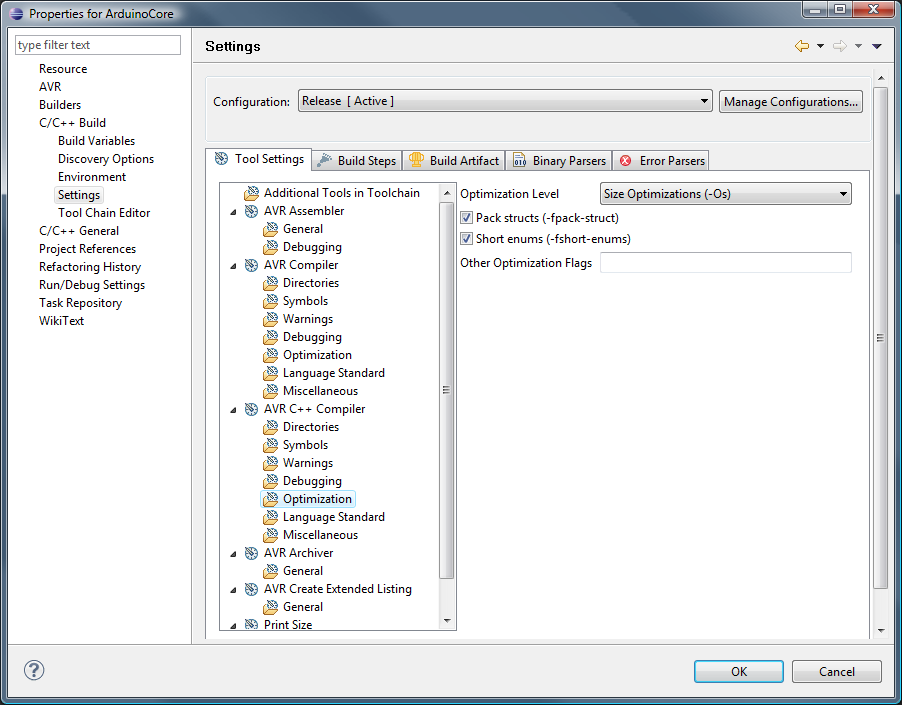

Thanks for this excellent write-up! I can’t wait to get home to try it. The Arduino IDE is great in general, but it’s leaps and bounds behind a fully fledged IDE like Eclipse. The Arduino project should really consider migrating to a dedicated Eclipse plugin (I know, I know, Eclipse complicates things which hurts the you-don’t-need-to-be-a-programmer concept behind Arduino).
The newer avrdude has a Arduino configuration for Hardware Configuration option which you can choose instead of Atmel STK500 Version 1.x Firmware… this fixed the avrdude: stk500_getsync(): not in sync: resp=0×00 message for me.
[…] You can download a free and open source Arduino IDE from Arduino.cc. It works pretty well and includes lots of example sketches to learn about the Arduino. Once you are comfortable with the basics you can upgrade to using Eclipse as your main IDE for Arduino. […]
hi,
nice tutorial, compiles fine on ubuntu 9.10, … but I got a major problem …
Does anyone experience an expansion of the .hex file from about 2000 bytes to over 8000 bytes once the Serial.begin and Serial.println commands are added? By leaving out the includes and changing global includes in Tone.cpp to local ones I could get the basic size down to about 1300 bytes, but once the Serial commands were back in it exceeded the 8k. I would usually not care about that, but as there are only 14k available on my Diecimila and the almost empty project takes more than half of the memory its a problem. I compiled the same code in the Arduino IDE and it told me the generated file was about 2300 bytes … so whats goin on? Might it be that there is some other serial lib compiled in? Shouldn’t that be the same Wiring code in the core anyway?
cheers rob
Hi,
Your description of getting eclipse to play nicely with Arduino was pretty good. It helped me a lot.
A million thanks for this.
I’ve been trying various tutorials on how to do exactly this for a few weeks and this is the first time I managed to get it to compile. Thanks for taking the time to write it up.
I’m mostly a beginner when it comes to both C programming and AVR. I like Eclipse however and have used it for Java for a while. Having said that, I met with a few errors while following your directions. I don’t know if they are my fault through ignorance or not, but I’ll describe them here anyway in case they might be of some use.
First error I got was with the linker command line pattern. I got a compiler error “avr-gcc.exe: –cref: No such file or directory”. It looks like the “–cref” should be “–cref”. After changing that I got a different error saying “ld.exe: cannot find -lArduinoCore”. Eventually, after trying just about everything I could think of I discovered that I needed both the name of the library in the “-l” box and the file location in the “-L” box. This might very well be a simple mistake, but it’s not clear to a novice.
After that it compiled perfectly and that’s as far as I’ve got for now. I don’t have my hardware with me as I’m writing this, so I can’t test the upload instructions.
Thanks again for posting this stuff, as I said I’m a big fan of Eclipse and being able to write AVR code with it makes life a lot easier.
I’m with DubiousTech on this one. Great article, but if you copy the command line arguments string from this website and paste them into your settings dialog box in Eclipse, things won’t compile. I spent a couple hours reinstalling everything and starting from scratch, because all my settings were copies of what is in this tutorial. I wish I had read the comments to this post and seen DubiousTech’s post … I would have saved a couple hours.
You’ve got to update this post so the dash in front of “cref” is actually two dashes. Please?
The programmer Atmel stk500v1 does not work with my arduino Duemilanove and it aways break the avr-dude and throw this message:
avrdude: stk500_recv(): programmer is not responding
avrdude done. Thank you.
Any suggestions?
[…] that’s another post. I wonder how much work a dedicated Arduino eclipse plugin would take. Using Eclipse with Arduino Duemilnove at Chipkin looks like the newest one. This one creates a C++ project, and says to set the baud rate […]
The comments all have one dash in front of cref. Perhaps there’s a CSS problem on this site? The source text may well have two dashes, leaving the author confused. It may even be browser-specific (I’m on Firefox on Windows).
Let’s try: One dash: “-cref” two dashes: “–cref”
Yep, I get a short dash and a long dash, but definitely just one character both times. The article definitely needs to be fixed, but it’s not simple to fix.
Caution: I had the same “avr-gcc.exe: –cref: No such file or directory” error and tried to add a dash in front of cref. This does not work! Since I’ve copied the command line from the tutorial I had one long dash, adding an extra dash results in having a long and a short dash which will throw an error. One has to delete the copied (long) dash and add two normal (short) dashes!
It’s obvious but believe me or not, it took me almost an hour to fix that :)
Thanks for the awesome tutorial!
Hi,
I got it nicely working. The only issue I have is that I have an issue with timings.
For example the delay statement below does note delay 5 and 5 seconds, it looks like it delays only about a 10th of it.
I checked that the F_CPU is set correctly to 1600000L wiht the -DF_CPU=16000000L command.
When I use the same source wiht in teh Arduino 0018 envirnment the delay is ok, Wiht Eclipse it is much shorter.
void loop()
{
digitalWrite(ledPin, HIGH); // set the LED on
delay(5000); // wait for a second
digitalWrite(ledPin, LOW); // set the LED off
delay(1000); // wait for a second
}
I’ve tried the tutorial, everything worked as planed. I didn’t had any timing/delay issues with Eclipse compared to the Arduino IDE. Did you use any other parameters? I didn’t specify -DF_CPU, nor any additional values… works like planed without that.
I really love what you post here, very insightful and intelligent. One thing though, I’m running Firefox on Linux and some of your layout pieces are a little off. I know it’s not a popular setup, but it’s still something to watch out for. Just shooting you a heads up.
great tutorial. But, I can not get eclipse to compile the Timer1 (http://www.arduino.cc/playground/Code/Timer1) library correctly when following these instructions. I managed to get the library to work with eclipse by first compiling the library with the Arduino IDE and including the object file in my eclipse project. More specifically, I created a simple sketch that included the Timer1 library, compiled the project, copied the TimerOne.cpp.o file from C:\Users\\AppData\Local\Temp\buildXXXXXXXXXXXXXXXXXXXXX.tmp\Timer1 into my eclipse project along with the the TimerOne.h file (excluded TimerOne.cpp), added “TimerOne.cpp.o” to the “Other Objects” panel within Project => Properties => C/C++ Build => Settings => AVR C++ Linker => Objects.
What settings are required so eclipse compiles this and similar libraries correctly? Currently, eclipse compiles the library, but the code does not operate appropriately. In my case, I’m using the timer library to control a step pin of a stepper motor driver. My stepper motor does not work when compiling the library with eclipse.
First of all, this is an excellent cook book.
However, it looks like that I am the only dummy to get things up and running.
– Installed all files according to “Download”, with the exception I got Arduino 0019.
– Followed your Build Library instruction: got 8 warnings: This file has moved to util\delay.h
– Followed your Create Project instruction (with the exception ArduinoCore is referenced to it’s release dir)
Getting the following errors:
Description Resource Path Location Type
make: *** [Test.elf] Error 1 Test C/C++ Problem
undefined reference to `main’ Test line 0 C/C++ Problem
make all
Building target: Test.elf
Invoking: AVR C++ Linker
avr-g++ -Wl,-Map,Test.map,–cref -mmcu=atmega328p -o”Test.elf” ./main.o
c:/program files/winavr/bin/../lib/gcc/avr/4.3.3/../../../../avr/lib/avr5/crtm328p.o:(.init9+0x0): undefined reference to `main’
make: *** [Test.elf] Error 1
I know that must be a simple setting which I cannot find, since I am new with Eclipse (which I like). Your help is much appreciated.
Dear All,
got it to work, at the third attempt it worked, ignore above.
R.
many thanks for the great tutorial. I am a beginner and would almost give up the Arduino to marry eclipse. My first project is working now. Now I want to debug using eclipse it. Is there even such a simple tutorial on this?
greet willi
google trans later thanks
I was getting the same error as Eduardo and was able to fix it by changing the baud rate to 19200. My Arduino is using the ATMEGA168.
So is there a way to create a default configuration so we don’t always have to go and set compiler, linker, and build options?
Firstly, thanks very much for this. The Arduino IDE drives me nuts and Eclipse is a breath of fresh air.
I appear to be having the same problem as Robby was. Although mine does not seem to go away by itself. I followed the steps exactly with the exception of the same step that Robby modified (pointing the IDE at the release folder for ArduinoCore). The following is what I get for an error.
Building target: Blinky.elf
Invoking: AVR C++ Linker
avr-gcc –cref -s -Os -o”Blinky.elf” ./Main.o -lArduinoCore -lm -Wl,-Map,Blinky.map,–cref -L”X:\ArduinoCore\Release” -mmcu=atmega328p
c:/winavr-20100110/bin/../lib/gcc/avr/4.3.3/../../../../avr/lib/avr5/crtm328p.o:(.init9+0x0): undefined reference to `main’
make: *** [Blinky.elf] Error 1
Any help would be appreciated…
Further to my previous post. I get the same error when I move the libArduinoCore.a to the project folder and adjust the library path accordingly.
One more bit of information… I did the same installation on my Linux machine (which where I prefer to work anyway) and I get pretty much the same error.
Building target: Blinky.elf
Invoking: AVR C++ Linker
avr-gcc –cref -s -Os -o”Blinky.elf” ./main.o -lArduinoCore -lm -Wl,-Map,Blinky.map,–cref -L/home/nwild/workspace/ArduinoCore/Release -mmcu=atmega328p
/usr/lib/gcc/avr/4.3.4/../../../avr/lib/avr5/crtm328p.o: In function `__bad_interrupt':
../../../../crt1/gcrt1.S:193: undefined reference to `main’
make: *** [Blinky.elf] Error 1
Obviously I am missing something?! Thanks for any help…
If anyone is following up on this using the latest version of Arduino, you may run into the following bug when trying
to build the Arduino core library:
In the file Tone.cpp (tone generator library), there will be multiple compile errors, because there’s apparently a small bug
in the code.
The following two includes are specified incorrectly:
#include
#include
they should instead read:
#include “wiring.h”
#include “pins_arduino.h”
Because these headers are LOCAL to the project, and not in the [WinAVR] include path!
(I have no idea how the whole thing compiles in the first place when using the Arduino IDE…)
Hope this helps :-)
Please, help me.
I’m with problem in use the command Serial.print. Follow bellow the command full:
int val = 10;
Serial.print(val,DEC);
———————-
The error is showed:
Building target: rastreador_new.elf
Invoking: AVR C++ Linker
avr-g++ -Wl,-Map,rastreador_new.map,–cref -L”/home/test/source/test” -mmcu=atmega168 -o”rastreador_new.elf” ./SoftwareSerial.o ./gps_api.o ./main.o ./template.o -lcore
./main.o: In function `loop':
main.cpp:(.text+0x28): undefined reference to `Print::print(int, int)’
I’m using linux ubuntu 9.10.
Thanks.
Hi,
I’ve got the following two problems and I hope that there is anybody out there who can help me:
1. I’m only able to flash my Arduino Duemilanove if I choose “Arduino” within the AVRDude settings. “STK500v1″ is not working. I got a no response error.
2. I’m unable to flash an Arduino UNO with AVRDude (WinAVR20101010). There are no settings within the AVDDude settings which are working. I got a no response error.
Thanks for your help.
Hint:
I solved the problems:
1. Arduino Duemilanove: AVRDude Programmer:”Arduino” and baudrate fixed to “115200” baud. 57600baud for example is n o t working.
2. Arduino UNO: AVRDude Programmer:”Arduino” and baudrate fixed to “115200” baud. 57600baud for example is n o t working.
Hello everybody
i am getting following error.
it says avr-gcc.exe: lm: No such file or directory
but i am unable to fix this problem. can anybody help me. thanking you
with regards
pasa
**** Build of configuration Release for project atmegaproject ****
make all
Building file: ../main.cpp
Invoking: AVR C++ Compiler
avr-gcc -I”D:\arduino\arduino-0021\hardware\arduino\cores\arduino” -Wall -Os -fpack-struct -fshort-enums -funsigned-char -funsigned-bitfields -fno-exceptions -mmcu=atmega328p -DF_CPU=16000000UL -MMD -MP -MF”main.d” -MT”main.d” -c -o”main.o” “../main.cpp”
Finished building: ../main.cpp
Building target: atmegaproject.elf
Invoking: AVR C++ Linker
avr-gcc –cref -s -Os -o”atmegaproject.elf” ./main.o -lArduinoCore – lm -Wl,-Map,atmegaproject.map,–cref -L”C:\Users\psilpakar\Contacts\workspace\ArduinoCore\Release” -mmcu=atmega328p
avr-gcc.exe: lm: No such file or directory
avr-gcc.exe: -E or -x required when input is from standard input
make: *** [atmegaproject.elf] Error 1
Thanks so much for this. I’ve spent the entire day going over other tutorials with no success. Yours was the first that worked.
A great tutorial and it works :)
@pasapasa
There should be no space between “- lm”.
Thank you so much!! I have Arduino Uno, I tried for a long time to use Eclipse, and now, using your project “Blinky” it works!!!!
To make AVRDUDE work, I substituite the versione “avrdude.exe” gived in WINAVR with the one gived in Arduino-0021 IDE.
Please help!
I have followed this tutorial but I can not compile the project.
I am using eclipse helios for 64 bits and I have done the set up as in the tutorial but I get the error:
Invoking: AVR C++ Linker
avr-gcc –cref -s -Os -o”ArduinoCore.elf” ./main.o -llibArduinoCore -lm -Wl,-Map,ArduinoCore.map,–cref -L”D:\EclipseWorkSpace\ArduinoCore” -mmcu=atmega1281
c:/winavr-20100110/bin/../lib/gcc/avr/4.3.3/../../../../avr/bin/ld.exe: cannot find -llibArduinoCore
However, the path of libArduidoCore.a is well specified in the AVR C++ Linker.
Thanks for the tutotial.
hi.
great article that got me up and running quite quickly.
I have a question…
is there a way to make all of the configuration process into some kind of template
so that you can choose it when creating a new project?
I mean…
I’d love to be able and just select a new project of that type without having to re-set all the paths,
library, configuration options
looking forward to an answer
ciao.ubi
I really like the Eclipse environment but I am not familiar with it at all. I created the Blinky project and encountered the following error that I can’t seem to get rid of. Please help.
Building target: Blinky.elf
Invoking: AVR C++ Linker
avr-gcc –cref -s -Os -o”Blinky.elf” ./main.o -lArduinoCore -lm -Wl,-Map,Blinky.map,–cref -L”C:\Users\Marius\Arduino\ArduinoCore” -mmcu=atmega328
c:/users/marius/my programs/winavr/bin/../lib/gcc/avr/4.3.3/../../../../avr/lib/avr5/crtm328.o:(.init9+0x0): undefined reference to `main’
make: *** [Blinky.elf] Error 1
Okey! I spend a very long time before programming success, so I hope this can help some people:
I have an Arduino UNO with Arduino-0022 IDE.
My command line is:
C:\WinAVR-20100110\bin\avrdude -pm328p -cstk500v1 -P//./COM11 -b115200 -F -Uflash:w:Blinky.hex:a
Thanks for this tutorial and enjoy;)
Josino,
i think your problem in this command:
avr-gcc –cref -s -Os -o”ArduinoCore.elf” ./main.o -llibArduinoCore
-lm -Wl,-Map,ArduinoCore.map,–cref
-L”D:\EclipseWorkSpace\ArduinoCore” -mmcu=atmega1281
is “-llibArduinoCore”:
You should have used just the name of the library, without the “lib” prefix.
Great Man. Got it work on x64 eclipse!
Great tutorial but i have some problems. I want to use the Ethernet.h.
I copied the Ethernet and SPI directory from arduino022/libraries to my project.
Then i changed the paths in order to be correct but i doesn’t work.
I get these errors
Building target: Blinky.elf
Invoking: AVR C++ Linker
avr-g++ -Wl,-Map,Blinky.map,–cref -L”C:\Users\plush\Desktop\projects\Blinky” -mmcu=atmega328p -o “Blinky.elf” ./main.o ./SPI/SPI.o ./Ethernet/utility/socket.o ./Ethernet/utility/w5100.o ./Ethernet/Client.o ./Ethernet/Ethernet.o ./Ethernet/Server.o ./Ethernet/Udp.o -lArduinoCore
./Ethernet/Client.o:(.data+0x18): undefined reference to `__cxa_pure_virtual’
./Ethernet/Client.o:(.data+0x1e): undefined reference to `__cxa_pure_virtual’
./Ethernet/Client.o:(.data+0x20): undefined reference to `__cxa_pure_virtual’
./Ethernet/Client.o:(.data+0x22): undefined reference to `__cxa_pure_virtual’
./Ethernet/Client.o:(.data+0x24): undefined reference to `__cxa_pure_virtual’
./Ethernet/Server.o:(.data+0xe): more undefined references to `__cxa_pure_virtual’ follow
make: *** [Blinky.elf] Error 1
Am i doing this correctly? Please help.
Hello
great tutorial , but i have one problem
I skiped step “Build the Arduino library”, and i made step by step step “Creating a Arduino project”, but after click on Project =>Build All, there is error
“Description Resource Path Location Type
make: *** [main.o] Error 258 Blinky line 0 C/C++ Problem
“, i have same versions as written in “Setting up the Eclipse environment”
Do somebody know where is the problem?
here is console outpu
**** Build of configuration Release for project Blinky ****
make all
Building file: ../main.cpp
Invoking: AVR C++ Compiler
avr-g++ -I”h:\prg\_microcontrolers\arduino-0018\hardware\arduino\cores\arduino\” -Wall -Os -fpack-struct -fshort-enums -mmcu=atmega1280 -DF_CPU=16000000UL -MMD -MP -MF”main.d” -MT”main.d” -c -o”main.o” “../main.cpp”
/usr/bin/sh: -c: line 1: unexpected EOF while looking for matching `”‘
/usr/bin/sh: -c: line 2: syntax error: unexpected end of file
make: *** [main.o] Error 258
Hi there,
I always new that Eclipse was a poor software – to put it politely – but going through what you people do …
I was to try it, maybe it become better during the last 4 years I didn’t touch it but … it was throwing errors galore during install.
They can’t even create a proper install-instruction page! One has to hunt for the solution for hours.
And now, the instructions above are faulty, there is no directory in the eclipse-avr-plugin as the instruction says …
I’m SICK of this. Nobody can make or do anything properly any more! Forget about this whole lot, stick to my trusty c++ text editor.
And you guys just struggle with Eclipse and the lot.
Cheers!
Excellent write up. I was able to set up Eclipse with AVR using these instructions. Off course only one compile error related to make file, needed –cref, that fixed it. However the AVRdude uploads file to my UNO board, but I get no blinks at all and idea that how can I debug this. I have tried baud rate 57600, but no luck, so I using 115200. At pointers or hints?
I’ve tried several howto’s to get Eclipse running with Arduino, this guide was spot on and it worked first time! Well written. :)
To all of you guys who experience time problems with the Blink project. When you change the sleep interval you must build again (Ctrl+B) before deploying to the Arduino.
[…] is a combination of the following sources: Arduino mit Eclipse als IDE (sorry, german only) Using Eclipse with Arduino Duemilanove AVR-Programmierung am Mac mit Eclipse: make-Problem (german again) Veröffentlich unter […]
Thank Your for this great tutorial!
But i cant build the example.
I got the following error:
[c]
Building target: ArduinoCore.elf
Invoking: AVR C++ Linker
avr-gcc –cref -s -Os -o”ArduinoCore.elf” ./HardwareSerial.o ./Print.o ./Tone.o ./WInterrupts.o ./WMath.o ./pins_arduino.o ./wiring.o ./wiring_analog.o ./wiring_digital.o ./wiring_pulse.o ./wiring_shift.o -lArduinoCore -lm -Wl,-Map,ArduinoCore.map,–cref -L”C:\Documents and Settings\Administrator\workspace\ArduinoCore” -mmcu=atmega328p
c:/documents and settings/administrator/desktop/arduino-0018/hardware/tools/avr/bin/../lib/gcc/avr/4.3.2/../../../../avr/lib/avr5/crtm328p.o:(.init9+0x0): undefined reference to `main’
make: *** [ArduinoCore.elf] Error 1
**** Build Finished ****
[/c]
Cheers!
There is now a eclipse plugin that works with the avrdude and compiler delivered with Arduino IDE.
This makes the installation process a lot easier.
Read more at http://eclipse.baeyens.it
Best regards
Jante
[…] followed this tutorial by Steven Smethurst and using this page to install the Arduino plugin, that got me to the point where I can build the […]
Hi
My board is Andruino Uno R3 and I am getting following error:
avrdude: stk500_getsync(): not in sync: resp=0x00
avrdude done. Thank you.
I try everything: disconnect and reconnect, changes in connect options etc. Any ideas??
Thanks for this tutorial. I got it all working, except…
The LED does not blink!
Building libraries, main.cpp, uploading to Arduino, no problem at all, no warnings, no errors, but whatever I try, after uploading the LED does not blink!
Thanks for this tutorial. I experienced one particularly nasty error when building the Blink project; ld.exe crashed hard with a win32 exception (on Windows 7 32 bit, using Arduino 1.0.5 but I also tried with 1.0.2 and had the same problem). Removing the relax flag from the build settings helped. I don’t know whether this is the default setting as I downloaded the project somewhere from Github. Anyway, here goes the info for the records.
Thanks for the tutorial!
All goes well till the linking part.
Building target: TestAVR.elf
Invoking: AVR C++ Linker
avr-gcc –cref -s -Os -o”TestAVR.elf” ./src/main.o -lArduinoCore -lm -Wl,-Map,TestAVR.map,–cref -mrelax -Wl,–gc-sections -L/home/harsh/workspace/avr/ArduinoCore/Release -mmcu=atmega328p
collect2: ld terminated with signal 11 [Segmentation fault], core dumped
make: *** [TestAVR.elf] Error 1
Binutils is the latest version